The word agent gets bolted onto everything right now. Usually it describes something that sounds either miraculous or completely made up.
This post skips that. I'll lay out what an AI agent actually is, how it differs from a chatbot, and what you need to understand before you build one. No framework required, and no architecture diagram you can't read. Just the loop, the four parts that matter, and the places where first attempts go wrong.
The whole idea
An AI agent is a software system that uses a language model to choose actions, observe the results, and decide what to do next.
Instead of answering a question once and stopping, it runs in a loop:
Goal -> decision -> action -> result -> next decision
That's the core idea. Everything else is implementation detail.
The model on its own is rarely an agent. An agent is the model plus the tools, context, permissions, and control logic that let it work inside an environment.
How a chatbot differs from an agent
A regular LLM interaction looks like this:
You ask a question -> model generates text -> done
An agent looks more like this:
You give a goal
-> model chooses an action
-> action runs
-> model receives the result
-> model chooses the next action
-> repeats until the goal is complete or the process stops
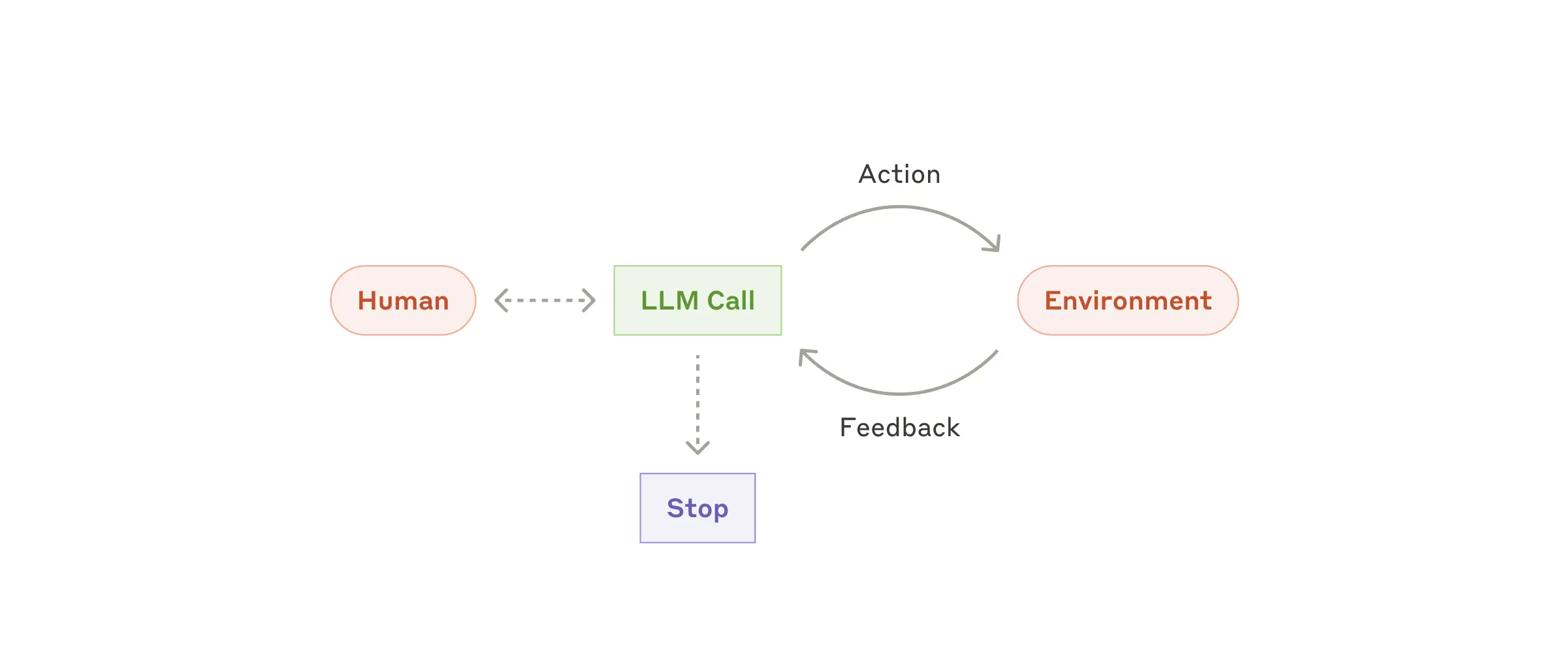
Figure from Anthropic's engineering post on building effective agents Anthropic.
The loop is the real difference. A smarter model is optional.
A chatbot gets one shot at an answer. An agent can act, inspect what happened, and adjust. It's the same shape as debugging:
- Run the program.
- Read the error.
- Change something.
- Run it again.
None of that makes an agent intelligent in the human sense. What it gives you is a system that can take several steps toward a goal.
Chatbot, workflow, or agent?
These three terms get used interchangeably. They describe different levels of flexibility.
- Chatbot: responds to input, usually with text. "Explain how gradient descent works."
- Workflow: follows a sequence someone already defined. Receive a support ticket, classify it, search the knowledge base, draft a response.
- Agent: picks the sequence at runtime. "Investigate this customer's billing problem and recommend a resolution."
A workflow walks a path developers mostly specified. An agent decides part of that path while it runs. Anthropic draws the same line, describing workflows as systems where LLMs and tools are orchestrated "through predefined code paths," and agents as systems where "LLMs dynamically direct their own processes and tool usage" Anthropic.
The four common pieces of an agent
Not every agent has the same architecture. Most contain these four.
A model
The model reads the goal, weighs the available information, and picks the next step.
It might decide to search a database, call an API, ask you a question, or stop and report that it can't continue.
Tools
Tools are functions the model can call. Searching the web. Running code. Querying a database. Reading files. Checking a monitoring system. Sending an email. Updating a ticket.
Without tools, a model can still reason and generate text. It can't meaningfully touch anything outside itself.
Tools usually land in three groups: data tools that retrieve information, action tools that change something, and orchestration tools that hand work to another agent or service.
Context or memory
The system has to track what already happened during the task. Previous messages. Tool calls and their results. Files and documents. A summary of earlier steps. Whatever came back from a database or vector store.
In most systems, memory is nothing more than keeping enough relevant context for the next decision.
A control loop
The control loop is the code that runs the process.
- Ask the model what to do.
- Execute the action it picked.
- Feed the result back to the model.
- Repeat, or stop.
This is the part most tutorials gloss over. It's also what separates an agent from a script that calls an API once.
A concrete example
Say you want an agent that answers "Is the latest deployment healthy? If not, why?"
A plain LLM call can't answer that reliably. It has no access to your monitoring dashboards, your deployment system, or your logs. Without that information it can only guess.
An agent could:
- Check the deployment status through a CI tool.
- Find that a test failed.
- Retrieve the logs for that test.
- Analyze the error.
- Decide whether it looks like a code defect or a flaky environment.
- Report the likely cause, or go gather more information.
That's a working agent. A model, several tools, a control loop, and a goal you can state in one sentence.
Where beginners get stuck
The loop needs a stopping condition
Without limits, an agent will keep calling tools and burn your budget doing it. Safeguards that actually work:
- A maximum number of steps
- A time limit
- A token or cost budget
- A list of actions that require approval
- A clear success condition
- A fallback for when the agent can't verify its own answer
Tool descriptions matter
The model only knows what a tool does from the name and description you write.
get_data() tells it almost nothing. Compare that with:
get_deployment_logs(deployment_id, since_minutes): returns error and warning logs from the specified deployment during the requested time window.
Clear names, clear arguments, a description, and an example all improve tool selection. [ADD: the tool description rewrite that fixed your worst tool-selection bug]
More tools are not always better
An agent with three well-defined tools can beat one with fifteen overlapping tools. Too many tools create ambiguity. Which search tool should it use? Which database holds the authoritative data? Is it allowed to send the message or only draft it? What happens when two tools return conflicting results?
Add a tool when it solves a limitation you've actually hit. Skip it when the only reason to add one is that the framework makes it easy.
Agents can fail silently
A bad tool call doesn't have to crash anything. It can return incomplete, stale, or wrong data. The model reasons from that and continues as if all is well. [ADD: the worst silent failure you have actually watched happen, in one line]
During development, log:
- The action the model chose
- The tool arguments
- The tool result
- Errors and retries
- Why the agent stopped
- Every human approval or override
Without those logs, debugging is guesswork.
How to build your first agent
You don't need a framework to understand the mechanism. The core loop, in outline:
while not done:
    action = model.decide(goal, history)

    if requires_human_approval(action):
        action = get_human_approval(action)

    result = run(action)
    history.append((action, result))

    done = model.check_if_finished(goal, history)
A real implementation also needs input validation, authentication, error handling, logging, rate limits, and permission controls. The basic idea stays this simple.
Frameworks like LangChain, CrewAI, and the model providers' agent SDKs handle parts of the plumbing: tool schemas, message formatting, retries, tracing, orchestration. Useful, and very good at hiding what's underneath.
If the loop doesn't make sense yet, build a small version by hand first. Otherwise you're stacking abstraction on top of confusion.
When to use an agent, and when not to
Agents earn their place when:
- A task takes several steps
- The exact sequence can't be known in advance
- The system has to choose among multiple tools
- Inputs are varied or unstructured
- A human would otherwise be coordinating several software systems
- The result can be checked or reviewed
Reach for something simpler when:
- A normal API call solves the problem
- The process is completely predictable
- Mistakes are unacceptable
- Very low latency is required
- There's no reliable way to verify the output
- The cost of repeated model calls outweighs the benefit
A plain workflow is usually cheaper, faster, and easier to test. OpenAI's guide to building agents recommends maximizing a single agent's capabilities first and only scaling to more agents when complexity demands it. Anthropic puts it bluntly: find "the simplest solution possible, and only increasing complexity when needed," which might mean not building an agentic system at all OpenAI Anthropic.
The risks that matter
Agents can change things in the outside world, so their risks don't look like a chatbot's.
Incorrect actions
The agent misreads the goal, picks the wrong tool, or keeps going from a false assumption. Errors stack up across steps.
Excessive permissions
An agent that can read every file, modify production systems, send messages, or spend money has a large blast radius. Give it the minimum access the task needs. Read-only is a good starting point.
Prompt injection
A webpage, an email, a document, or an issue tracker entry can carry instructions designed to manipulate the agent. An agent asked to summarize a webpage might hit hidden text telling it to reveal confidential information or call an unrelated tool. Treat external content as data, never as trusted instructions.
Untrusted tools
Third-party tools can return wrong data, expose sensitive information, or carry security weaknesses of their own. Review tool access as carefully as model access.
Weak accountability
Once several tools and agents are in play, explaining why a particular action happened gets hard. Logging, approval checkpoints, monitoring, and clear ownership are what keep the system explainable. Joint guidance published May 1, 2026 by CISA, the NSA, and the Five Eyes cyber agencies lands on the same conclusion: adopt agentic AI incrementally, start with low-risk tasks, and treat human oversight and monitoring as requirements rather than options CISA Crowell & Moring.
A safe first project
Build a small research agent that:
- Accepts a topic
- Searches a limited set of trusted sources
- Extracts key claims
- Records citations
- Produces a structured brief
- Requires human review before anything is published
Start with read-only tools. Don't begin with unrestricted shell access, financial transactions, production deployment, or automatic email sending.
A progression that works:
- Make one model call.
- Add one read-only tool.
- Add structured output.
- Add a verification step.
- Log every action and result.
- Add human approval.
- Test against known examples.
- Expand the toolset only when necessary.
You'll learn more from a small agent you can watch than from a complicated multi-agent demo you can't explain or debug.
Where to go from here
Once the basic loop makes sense:
- Planning versus one-step reaction
- Tool selection and structured outputs
- Short-term context versus long-term memory
- Retrieval-augmented generation
- Agent evaluation and observability
- Human approval patterns
- Multi-agent coordination
- Security and prompt-injection defenses
None of it matters if the basic architecture is still fuzzy. Start with the four foundations: a model, tools, context, and a control loop.
Build a toy agent this week. One that checks the weather and decides whether to nag you about an umbrella is fine. A small working system teaches you more than most hype-heavy explanations.
The takeaway
An AI agent is a model-driven software system that chooses actions inside a defined environment. There's no magic employee in there, and no path to general intelligence either. Whether it's useful depends far more on the tools, permissions, evaluation, and human oversight around it than on how impressive the model sounds.
The practical way to think about agents: a model inside a controlled loop that can act, observe, and try again. That's the whole trick, and it's enough to build something useful.
FAQ
How much does it cost to run an agent compared with a single chatbot call? Every loop iteration resends the goal, the history, and the tool results to the model. A task that takes ten steps can cost ten times a single call, sometimes more as the context grows, since naive loops re-bill every previous step AugmentCode. Set a token or dollar budget per run, keep tool results concise, and summarize earlier steps instead of passing the full history forever.
How do you evaluate an agent before trusting it in production? Build a small set of known tasks with expected outcomes and run the agent against them after every change. Record full traces of actions, arguments, and results so you can see where the reasoning went wrong. Check the path as well as the final answer, since an agent can reach a correct result through unsafe or wasteful steps.
Is an AI agent the same as autonomous AI? Autonomy in an agent is scoped. It decides the sequence of actions inside the environment, tools, and permissions you define. It sets no goals of its own, stays within the boundaries you configure, and stops when its stopping condition fires. Claims about fully autonomous AI describe something else, usually a marketing one.
Can I build an agent without LangChain or CrewAI? Yes, and it's often the better first move. A minimal agent is a while loop, an API call to a model, a function dispatcher, and a history list, which fits in roughly fifty lines of Python dev.to. Frameworks earn their keep later, when you need standardized tool schemas, tracing, retries, and orchestration. Build the loop by hand once so you know what the framework is doing for you.